Showing posts with label week 4. Show all posts

The threat of online security: How safe is our data?

>> Thursday, June 25, 2009


Nowadays, people rely on computers to create, store and manage critical information. Consequently, it is important for users to aware that computer security plays a major role in protecting their data from loss, damage, and misuse. Similarly, online security has been online trader’s main concern in protecting their websites from potential threats, such as phishing, security hacking, information theft, virus, worms and etc.

Today, i would like to discuss about the threats being bring by technical attacks and nontechnical attack.


Technical attack:
Technical attack is an attack perpetrated using software and systems knowledge or expertise. There are several threats being bring by technical attack, such as Denial-of-service(DoS)attack, virus, worm and others.
(i) Denial-of-service(DoS)attack
DoS refer to an attack on a website in which an attacker uses specialized software to send a flood of data packets to the target computer with the aim of overloading its resources.It may cause a network shut down, making it impossible for users to access the site.

(ii) Distributed denial-of-service(DDoS)attack
DDoS is a DoS attack in which the attacker gains illegal administrative access to as many computer on the Internet as possible and uses these multiple computers to send a flood of data packets to the target computer.

(iii) Virus
Virus is a piece of software code that inserts itself into a host,including the operating systems,to propogate it;it requires that its host program be run to activate it. A virus will simply infect and spread over the operating systems and consequently cause the collapse in the server system. Although viruses are self-replicating, they cannot propogate automatically across a network, they require a human to move them from one computer to another.
(iv)Worm
It's a malicious software which is a stand alone application.
It's often designed to propagate through a network, rather than just a single computer. When your computer is infect of worm, computer will slow starting or slow running. It'll also face unexpected or frequent system failures.

(v)Trojan Horse
A trojan horse is a program that appears to have a useful function but contains a hidden function that presents a security risk. The name is derived from the Trojan Horse in Greek mythology.


Nontechnical attack:
Nontechnical attack refer to an attack that uses chicanery to trick people into revealing sensitive information or performing actions that compromise the security of a network. An example of nontechnical attack is phishing. Phishing is a broadly launched social engineering attack in which an electronic identity is misrepresented in an attempt to trick individuals into revealing credentials.
These internet security threats will try to steal your information from your computer through the internet. It's very danger if our computer online without any internet security system such as anti-virus. For example, Trojans will track into your computer and steal your personal information such as password of your e-banking account, email account and etc. For business companies, it's really a treat to them because they save their business infromation in the computer such as daily profits, project or new planning for their business venture. Therefore, we need to take some preventive actions to prevent these threats.

Read more...

Phishing: Examples and its prevention methods

What is Phishing?

Phishing is a computer geek spelling of the word "fishing". It is a crimeware technique used to steal the identity of a target company to get the identities of its customer. In general, phishing attacks are performed with the following four steps:
1) Phishers set up a counterfeited Web site which looks exactly like the legitimate Web site, including setting up the web server, applying the DNS server name, and creating the web pages similar to the destination Web site, etc.
2) Send large amount of spoofed e-mails to target users in the name of those legitimate companies and organizations, trying to convince the potential victims to visittheir Web sites.
3) Receivers receive the e-mail, open it, click the spoofed hyperlink in the e-mail, and input the required information.
4) Phishers steal the personal information and performtheir fraud such as transferring money from the victims’ account.


Examples of Phishing

ebay is one of the most popular phishing places. Scammers phish on ebay to obtain eBay ID’s which then are used to sell fake or non-existent goods or such accounts can be sold further in the underground market. In other words, the new owners of stolen eBay ID’s now are equipped with positive feedback, previously generated by the real owner, and are now used to scam people.

This eBay phishing email includes the eBay logo in an attempt to gain credibility. The email warns that a billing error may have been made on the account and urges the eBay member to login and verify the charges.


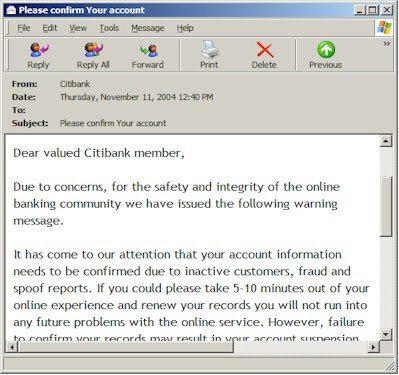
Citibank is currently the target of a series of phisher scams designed to steal sensitive personal information from Citibank customers. Scam emails, supposedly from Citibank, have been randomly mass mailed to thousands of Internet users. The scammers rely on the statistical probability that at least a few of the recipients will be Citibank customers and that a small number that are customers will fall for the scam.

There is no shortage of irony in the Citibank phishing example here. The attacker claims to be acting in the interests of safety and integrity for the online banking community. Of course, in order to do so, you are instructed to visit a fake website and enter critical financial details that the attacker will then use to disrupt the very safety and integrity they claim to be protecting.


Here are some tips to prevent become a victim of Phishing:

  • Be suspicious of any email with urgent requests for personal financial information. Do not respond to it.
  • Don't use the links in an email to get to any web page, if you suspect the message might not be authentic. Instead, call the company on the telephone, or log onto the website directly by typing in the Web address in your browser.
  • Avoid filling out forms in email messages that ask for personal financial information.
  • Don’t email personal or financial information. Email is not a secure method of transmitting personal information. Unfortunately, no indicator is foolproof; some phishers have forged security icons like the lock icon on an order form.
  • Always ensure that you're using a secure website when submitting credit card or other sensitive information via your Web browser.
  • Use the internet to shop for an item. Then telephone your order to the vendor rather than using the so-called secure order form.
  • Consider installing a Web browser tool bar or anti-phishing software to help protect you from known phishing fraud websites. Perform a search engine search on "anti-phishing software" to find a product.
  • Regularly check your bank, credit and debit card statements to ensure that all transactions are legitimate. If anything is suspicious, contact your bank and all card issuers.
  • Regularly log into your online accounts. Check each account every 29 days or less.
  • Ensure that your browser is up to date and security patches applied.
  • Use anti-virus and anti-spyware software and a two-way firewall, and keep them up to date.
  • If you believe you’ve been the victim of a phishing scam, file your complaint at Federal Trade Commission's website ftc.gov, and then visit the FTC’s Identity Theft website at www.consumer.gov/idtheft.

References:
http://antivirus.about.com/od/emailscams/ss/phishing_4.html
http://www.webopedia.com/TERM/P/phishing.html
http://antivirus.about.com/od/emailscams/ss/phishing_5.htm
http://www.tweakspeed.com/Stop-Phishing.htm

Read more...

How to safeguard our financial and personal data

>> Wednesday, June 24, 2009

Internet and computer are the important tools in this new age, more and more people are doing their personal activities through online such as e-payment to pay their bills and online shopping. We need to fill up our personal information such as names, addresses, phone number, bank account and credit card number in the online register forms before we proceed online payment. Therefore, It is not easy to not to share our personal data through online with others or stolen by others if the informations are not be protected. Hence, it is so important that we need to protect our financial and personal data online from being one of the victims.

Here are some tips for safeguard our financial and personal data:
  • Do not use the password that easy figured out by others. Many people prefer to use the password that easy for memorize, therefore many people like to use own name or date of birth as the password. The simple password is using, the easy the hacker figured it and log on to our financial and personal data.

  • Avoid to save the financial and personal data in the computer. Keep all the personal data such in the computer such as name, addresses, bank account number and password, it may easy for us to refer when need to use it. But it is very easy to steal by others when they using the computer. In stead of keep the data in the computer, we can save our personal data in the thumb drive and put in the safe place, plug into the computer when we need to use the data.

  • Use the sucure internet browser when we are online. IE and Mozilafox are the most common browsers used by the online users. By using a secure internet browser can help to protect against browser hijacking, etc.

  • Make sure anti-virus and anti-spyware are up to date. Installing the PC security software can protect from viruses, spyware, hacker, phishing scams and etc. Therefore, we should installed trusted anti-virus software program like Kaspersky, McAfee or free anti-virus software to protect our PC from online fraud.

  • Always access the Internet from behind a firewall. A firewall adds a security layer between our PC and the Internet, and protecting our personal information stolen by hackers, destroying our files, or using our PC to attack others.

  • Check the credit report frequently. We should check our credit history up to date . This is one of the best ways to find out if someone is using our personal finance information without our permission.

Read more...

Review

>> Tuesday, June 23, 2009


It's a sad fact of life for today's information-driven organizations that the nature of security threats is continuously shifting and evolving. Intrusion mechanisms such as worms, Trojans and rootkit exploits continually evolve into more-developed forms and wax and wane in terms of number and frequency of attacks.

Analysts estimate roughly 75 percent of all security attacks are targeted at applications. However, only 10 percent of enterprise security spend is focused on application security. This show the potential attacks to be encountered by the enterprises. So they are starting to focus more on application security that requires customers to invest in extending what they are doing at the network level to the application level. In addition, the need to protect applications and data resources more proactively is also driving the development and application of heuristics. Otherwise, in my opinion if a person does not know how to best configure it, it will make a computer slow and software not working properly.

If a potential threat can be identified early, prevention will be that much easier. That's where the process of designing new heuristics begins. This process benefits our users or consumers. As the primary means of identifying new threats, heuristics have become a core component of today's security systems. The key component in good heuristics design is that which will take into account the existing methods and vectors of infection, of course. And just as importantly, false positives must be kept to an absolute minimum. Heuristics, in contrast, are used to protect against unknown threats. Heuristics analyze the files as they are scanned or accessed, and look at what it appears the file will try to do. If the file is writing to the registry and modifying a system file, it may be a critical security patch.
Whether you decide to add a security component to your web site project initially it is a good idea to think about or have a discussion about web site security when planning the site. You should also review your security systems periodically whether that is changing your password or reviewing and updating your security system.

Read more...

  © Free Blogger Templates Skyblue by Ourblogtemplates.com 2008

Back to TOP